Zendesk spans core ticketing, omnichannel service, knowledge, automation, analytics, voice, and AI-assisted workflows. That breadth makes it a plausible system of record for a growing service organization—but it also means the right configuration, plan, and rollout matter more than the product name.
Testing and image disclosure: ChoiceRidge has not completed a hands-on Zendesk trial for this draft. Findings use current Zendesk product, pricing, and help documentation checked August 31, 2026. Both images are original editorial visuals, not Zendesk interfaces. No Zendesk logo is used because its brand page requires a license or written permission for third-party logo use.

Bottom line
Zendesk fits teams that need structured service operations across more than a shared inbox: queues, triggers, knowledge, reporting, multiple channels, and plan-dependent routing controls. It can be excessive for a small ecommerce team whose main requirement is fast access to order actions. The decision should turn on channel complexity, routing, governance, and integration requirements—not feature count.
Product and plan structure
Zendesk's public annual pricing currently lists Support Team at $19 per agent per month, Suite Team at $55, and Suite Professional at $115. Enterprise + Copilot requires a sales conversation. The public page associates email/ticketing, basic routing, dashboards, responses, customer context, automations, and triggers with Support Team. Suite Team adds AI Agents, knowledge, Action Builder, omnichannel routing, messaging/live chat, and telephony. Suite Professional adds capabilities including skills-based routing, IVR, Admin Copilot, App Builder, Writing Tools, and Quick Reports.
Those are public list prices and headline inclusions, not a complete cost model. Confirm annual commitment, AI usage, voice, messaging, storage, support, sandbox, implementation, marketplace apps, and data migration.
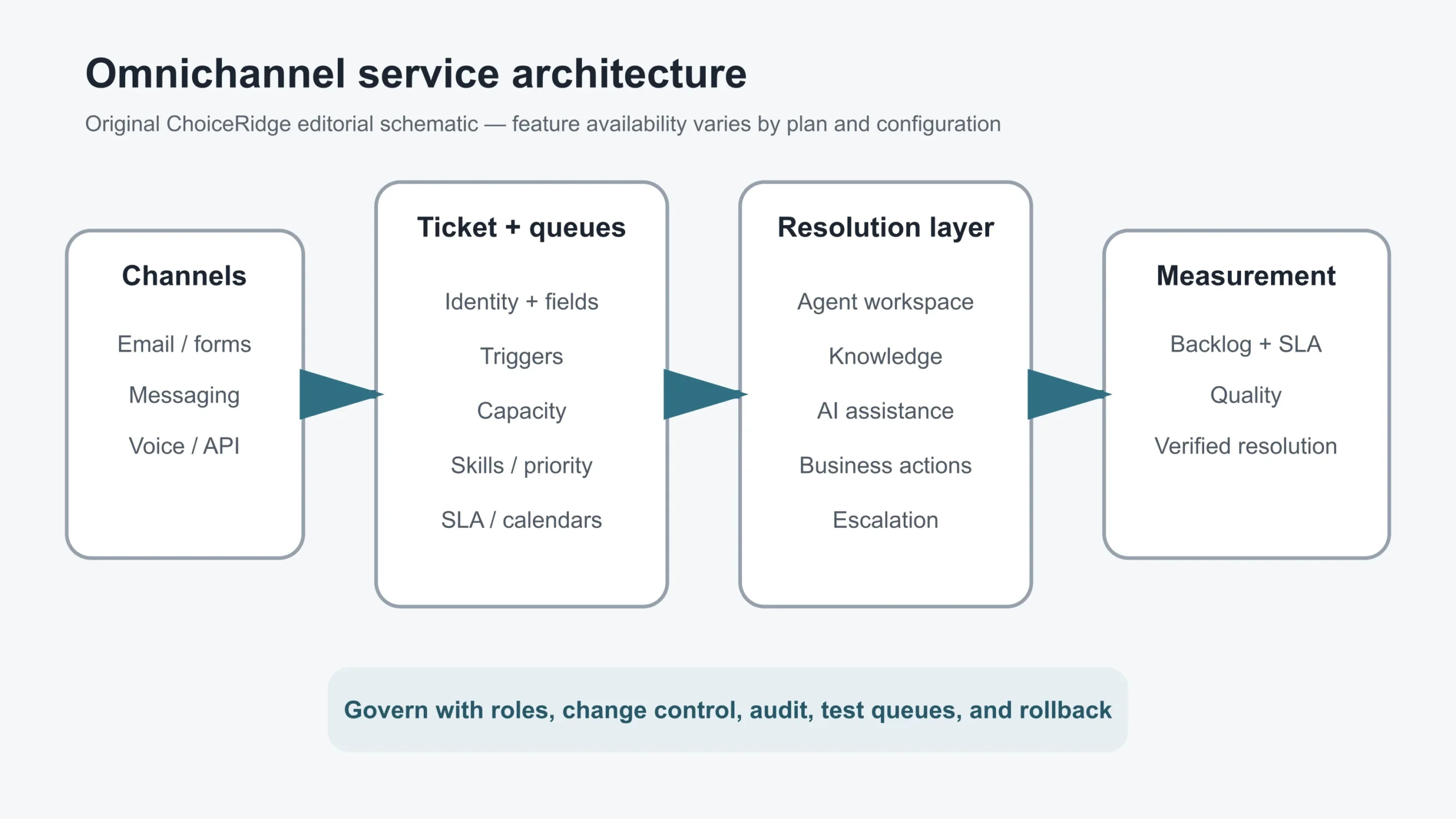
Routing and operating model
Zendesk documents omnichannel routing across email—including web forms, side conversations, and API—calls, and messaging. Assignment can use availability and capacity; higher plans add factors such as SLA targets, priority, and skills. Custom queues can order work by operational criteria.
This is valuable when the organization must prevent cherry-picking, balance live and asynchronous work, or enforce differentiated service. It also introduces configuration dependencies. Zendesk requires Agent Workspace for omnichannel routing, and some channel combinations have additional prerequisites. Its own documentation recommends planning the routing configuration before activation to reduce disruption.
AI and knowledge
The public pricing page presents AI Agents, knowledge, and action-building as parts of the suite. Zendesk's AI trust documentation describes privacy, security, transparency, customer control, confidence indicators for some predictions, and explanations of AI-agent actions. These statements establish useful evaluation questions; they do not replace contract review or testing with the organization's content and case mix.
Evaluate AI on verified resolution, not containment alone. Build a test set that includes ambiguous questions, account-specific requests, outdated articles, safety/privacy escalation, unsupported languages, prompt injection, and actions that require approval. Record hallucination, unnecessary escalation, silent failure, and repeat contact.
Where it fits best
- Support organizations coordinating email, messaging, voice, web forms, and API-created cases.
- Teams needing capacity-, priority-, SLA-, or skill-aware routing.
- Businesses that can invest in taxonomy, roles, knowledge ownership, reporting definitions, and ongoing administration.
- Organizations that want a broad service platform and can govern its integrations and AI features.
Where to be cautious
- A small team may pay for and administer more system than it needs.
- Per-agent pricing grows with staffing, while add-ons and usage may sit outside the headline price.
- Omnichannel activation can change queue behavior quickly; staged rollout and rollback matter.
- A generic service platform may require more integration work than an ecommerce-native helpdesk for order actions.
- Feature availability varies by plan, account history, channel, and configuration.
Proof-of-concept checklist
- Import representative tickets and preserve requester, timestamps, status, comments, attachments, and custom fields.
- Route email, messaging, and voice work using realistic capacities and calendars.
- Test SLA, priority, and skills behavior, including overflow and no-agent scenarios.
- Confirm identity merge and privacy behavior across channels.
- Connect a business system and verify read/write permissions and auditability.
- Evaluate AI answers against a maintained knowledge set and adversarial cases.
- Reconcile dashboards with a raw ticket sample.
- Test role separation, SSO, deletion, export, and sandbox/change controls required by policy.
- Calculate three-year cost with agents, channels, AI, apps, services, and migration.
Pros and drawbacks
| Strengths | Drawbacks or unknowns |
|---|---|
| Broad ticketing and omnichannel architecture | Configuration and plan complexity |
| Capacity and plan-dependent advanced routing | Per-agent cost can expand with the team |
| Knowledge, actions, analytics, and AI in one ecosystem | Ecommerce actions may require additional integration work |
| Documented enterprise governance options | Successful rollout demands administration and change control |
Verdict
Zendesk is strongest when service is an operating discipline rather than an inbox. It deserves a shortlist when multiple channels, queues, SLAs, skills, knowledge, and governance must work together. Smaller or highly ecommerce-specific teams should compare the operational overhead and integration depth with narrower alternatives. The best evidence is a staged proof of concept using real routing rules and historical case patterns.
Start with the ChoiceRidge Ecommerce Helpdesk Software Requirements guide and record evidence in the Software Comparison Scorecard.